







 January 30, 2025
 6 min reading time


Days Sales Outstanding (DSO) is an important cash flow metric, frequently monitored by Chief Financial Officers (CFOs) and finance departments. Days of pending sales represents the average number of days that a company takes to receive payment for a sale. A high number of DSOs suggests that a company is facing delays in receiving payments. If a company is spending money faster than it spends, it may end up with a cash flow problem. Generally, it is better to reduce the DSO and reach the smallest possible number.
In my experience, financial directors and financial departments have a “feeling” of what the appropriate level of DSO should be, based on historical context and experience.
How DSO is monitored and calculated
The DSO is often determined monthly, quarterly or annually. The DSO is calculated by dividing the total sales to be received for a given period by the total sales for the same period. This result is then multiplied by the number of days in the period (ie, 30 days is calculated monthly, 90 days is calculated quarterly, etc.).
Normally, most of the financial departments have DSO calculated in a plan or in a report or automated panel. Unless the DSO of this specific period appears outside the community, the analysis ends there. As you will see below, if you are looking for a number or a graph created in a plan, it does not provide much useful information.
Like most two financial departments »monitor» or DSO regarding irregularities
I reviewed some historical data from a real publicly held company and examined the DSO data reported quarterly. Examining the data, there is an interval of 57.905 to 70.680, which means that, unless the next DSO is outside this interval, it probably would not raise any doubts. The problem with this is (as my chef says) “you can direct a road” and therefore being “on the road” is basically meaningless.

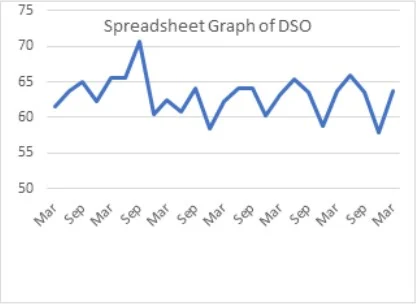
Here is a typical visualization on a plan (or KPI panel). Can you identify a trend or an outlier?
Minitab can provide a better way to monitor and analyze
Using Minitab Statistical Software, I managed to paste exactly the same set of data and run a time series analysis (using the Decomposition command to take into account the quarterly seasoning). To do this, I received two very good insights: first, the decomposition graph of temporary series highlighted a trend of melhoria do DSO. The financial team can be implemented, proactively, processes to collect faster or more quickly. In any case, the tendency shows that the DSO remains, or that it is positive.
Now, compare the Minitab chart below with a typical plan chart (which was edited to, without success, paint a clearer image). It is clear that the Minitab graph highlights a trend that may not be noticed in a plan graph.
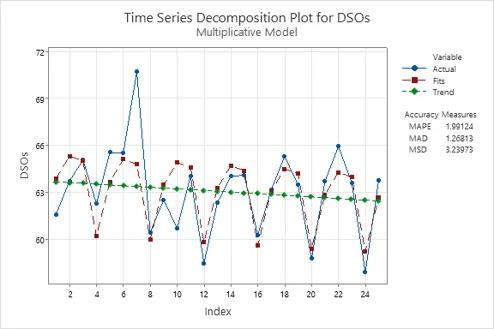
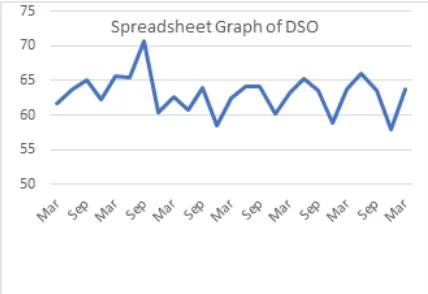
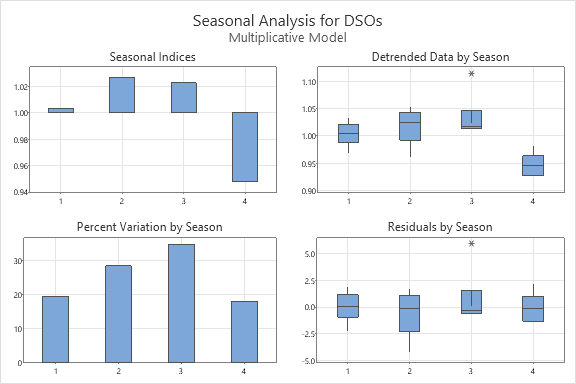
The second insight is to understand the seasoning of the collections. The graphs below clearly highlight that, in the fourth quarter, the company collected accounts to receive significantly faster than any other quarter. Maybe there is something that the team is doing that could be applied in the first three quarters of the year? Regardless, understanding timing helps you recognize when the DSO is heading in the wrong direction before it becomes too late. From the point of view of the plan, seasonally it can also be seen, apart from a clear indication that December has lower DSO, there is not much information about the first three quarters.
Tell me something I don't know: how do I avoid high DSO?
A financial director can tell me and challenge me that CFOs must intuitively understand seasonally how DSO is becoming a trend. Maybe. Doing this exercise does not only confirm (or clarify) the financial department, as it also helps prevent future failures.
In addition to monitoring the DSO trend, the financial department must maintain a DSO control letter. The control charts, most commonly used in process monitoring, indicate when your process is out of control and corrective actions are not necessary. There are many different types of control charts for different types of data and processes, so use an individual chart with two seasonally adjusted data because the quarterly DSO is effectively an average over the course of a quarter.
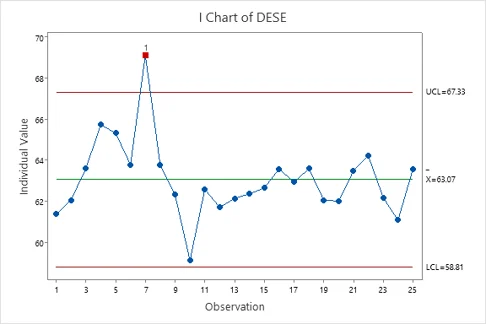
The above control letter highlights that the observation point 7 (the September quarter, where the DSO was above 70) was “fora de controle”. As we see from the trend, these actions are clearly taken not only to mitigate the problem, but also to make what appears to be lasting blessings.
The control letter also adds context. Not starting, a growing trend signaled a problem that needed to be addressed. Curiously, after its lowest level (observação 10), the company has once again seen a growing trend for DSO. The control chart shows that this trend is moving in the middle direction, instead of pointing out another cliff. If some people ask about this new and growing negative trend (for example, CEOs, investors, CFOs), a control letter is an excellent tool to demonstrate that there was no reason to dream or be alarmed.
Once again, compare the control chart with the one created by a plan. Which one provides you with the most insights?
These simple analyzes take less than five minutes…and can be applied to many other metrics!
As financial teams tend to live in their financial systems and plans, it is likely that there is some statistical anxiety (or that it is a real thing!) delaying you. You can ensure that analysis is not only quick and simple, but can also be configured and automated in a panel using Minitab Connect. It can also be applied to other important financial metrics, so that you can take advantage of your newly discovered statistical knowledge.
If you are a start-up in which cash flow is essential to survive every day or a large company with significant cash flows, capturing trends and problems before they exist will certainly save money and time.
Source: Minitab
Talk to me Software.com.br and know better Minitab together with a specialist.